

Gizmos for parametric objects in Bonsai
I have been experimenting with drawing gizmos in the viewport for parametric objects, I'll share a standalone script you can just run in the script editor to test out. Feel free to give any constructive feedback.
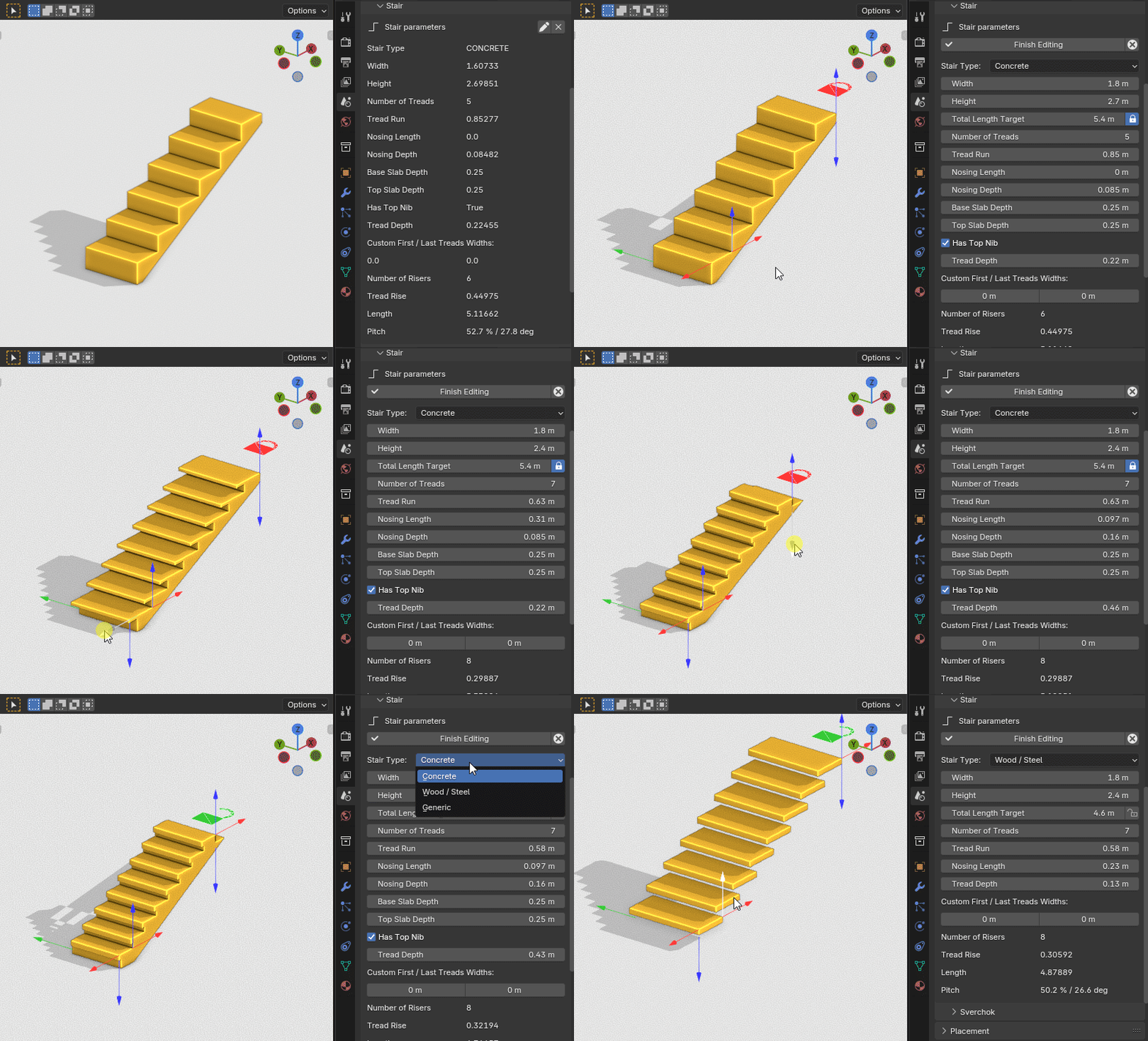
Things to keep in mind / to improve :
- Use custom meshes for arrow gizmos or communicate better what does what. Unfortunately ressources on how to use gizmos is ... pretty scarce so it's a lot of trial and error.
- No snapping
- Support all parameters
- No idea about performance but I didn't notice anything drastic
Cheers
import bpy

from bpy.types import Gizmo
from mathutils import Vector, Matrix
from math import pi


class BIM_OT_toggle_gizmo(bpy.types.Operator):
    bl_idname = "serendipicad.toggle_gizmo"
    bl_label = "Toggle Gizmo"
    obj: bpy.props.StringProperty()
    prop_path: bpy.props.StringProperty()

    def execute(self, context):
        obj = bpy.data.objects[self.obj]
        parts = self.prop_path.split(".")
        for part in parts[:-1]:
            obj = getattr(obj, part)
        setattr(obj, parts[-1], not getattr(obj, parts[-1]))
        return {"FINISHED"}


class GizmoLock(Gizmo):
    bl_idname = "VIEW3D_GT_lock"

    __slots__ = (
        "custom_shape_closed",
        "custom_shape_open",
    )

    tris_closed = [
        (-0.3519617021083832, 0.7437955141067505, 0.0),
        (-0.3048076927661896, 0.9197763204574585, 0.0),
        (-0.4225003123283386, 0.9877263307571411, 0.0),
        (-0.4225003123283386, 0.9877263307571411, 0.0),
        (-0.3048076927661896, 0.9197763204574585, 0.0),
        (-0.1759808510541916, 1.0486031770706177, 0.0),
        (-0.24393069744110107, 1.1662957668304443, 0.0),
        (-0.1759808510541916, 1.0486031770706177, 0.0),
        (2.9078805141580233e-08, 1.0957571268081665, 0.0),
        (2.9078805141580233e-08, 1.2316569089889526, 0.0),
        (2.9078805141580233e-08, 1.0957571268081665, 0.0),
        (0.1759808510541916, 1.0486031770706177, 0.0),
        (0.243930846452713, 1.1662957668304443, 0.0),
        (0.1759808510541916, 1.0486031770706177, 0.0),
        (0.30480796098709106, 0.9197763204574585, 0.0),
        (0.4225005805492401, 0.9877263307571411, 0.0),
        (0.30480796098709106, 0.9197763204574585, 0.0),
        (0.35196200013160706, 0.7437955141067505, 0.0),
        (-0.48786139488220215, 0.7437955141067505, 0.0),
        (0.48786139488220215, 4.5077928945147505e-08, 0.0),
        (0.48786139488220215, 0.7437955141067505, 0.0),
        (-0.3519617021083832, 0.7437955141067505, 0.0),
        (-0.4225003123283386, 0.9877263307571411, 0.0),
        (-0.48786139488220215, 0.7437955141067505, 0.0),
        (-0.4225003123283386, 0.9877263307571411, 0.0),
        (-0.1759808510541916, 1.0486031770706177, 0.0),
        (-0.24393069744110107, 1.1662957668304443, 0.0),
        (-0.24393069744110107, 1.1662957668304443, 0.0),
        (2.9078805141580233e-08, 1.0957571268081665, 0.0),
        (2.9078805141580233e-08, 1.2316569089889526, 0.0),
        (2.9078805141580233e-08, 1.2316569089889526, 0.0),
        (0.1759808510541916, 1.0486031770706177, 0.0),
        (0.243930846452713, 1.1662957668304443, 0.0),
        (0.243930846452713, 1.1662957668304443, 0.0),
        (0.30480796098709106, 0.9197763204574585, 0.0),
        (0.4225005805492401, 0.9877263307571411, 0.0),
        (0.4225005805492401, 0.9877263307571411, 0.0),
        (0.35196200013160706, 0.7437955141067505, 0.0),
        (0.487861692905426, 0.74379563331604, 0.0),
        (-0.48786139488220215, 0.7437955141067505, 0.0),
        (-0.48786139488220215, 4.5077928945147505e-08, 0.0),
        (0.48786139488220215, 4.5077928945147505e-08, 0.0),
    ]

    tris_open = [
        (-0.12838619947433472, 1.3143587112426758, 0.0),
        (0.025773197412490845, 1.411454677581787, 0.0),
        (-0.0144234299659729, 1.541273593902588, 0.0),
        (-0.0144234299659729, 1.541273593902588, 0.0),
        (0.025773197412490845, 1.411454677581787, 0.0),
        (0.20782703161239624, 1.4184625148773193, 0.0),
        (0.23792517185211182, 1.5509872436523438, 0.0),
        (0.20782703161239624, 1.4184625148773193, 0.0),
        (0.3689943850040436, 1.3335046768188477, 0.0),
        (0.4613226056098938, 1.433225393295288, 0.0),
        (0.3689943850040436, 1.3335046768188477, 0.0),
        (0.4660903215408325, 1.1793451309204102, 0.0),
        (0.5959094166755676, 1.2195416688919067, 0.0),
        (0.4660903215408325, 1.1793451309204102, 0.0),
        (0.47309836745262146, 0.997291088104248, 0.0),
        (0.6056233048439026, 0.9671931266784668, 0.0),
        (0.47309836745262146, 0.997291088104248, 0.0),
        (0.3881405293941498, 0.8361238241195679, 0.0),
        (-0.48786139488220215, 0.7437955141067505, 0.0),
        (0.48786139488220215, 4.5077928945147505e-08, 0.0),
        (0.48786139488220215, 0.7437955141067505, 0.0),
        (-0.12838619947433472, 1.3143587112426758, 0.0),
        (-0.0144234299659729, 1.541273593902588, 0.0),
        (-0.22810709476470947, 1.406686782836914, 0.0),
        (-0.0144234299659729, 1.541273593902588, 0.0),
        (0.20782703161239624, 1.4184625148773193, 0.0),
        (0.23792517185211182, 1.5509872436523438, 0.0),
        (0.23792517185211182, 1.5509872436523438, 0.0),
        (0.3689943850040436, 1.3335046768188477, 0.0),
        (0.4613226056098938, 1.433225393295288, 0.0),
        (0.4613226056098938, 1.433225393295288, 0.0),
        (0.4660903215408325, 1.1793451309204102, 0.0),
        (0.5959094166755676, 1.2195416688919067, 0.0),
        (0.5959094166755676, 1.2195416688919067, 0.0),
        (0.47309836745262146, 0.997291088104248, 0.0),
        (0.6056233048439026, 0.9671931266784668, 0.0),
        (0.6056233048439026, 0.9671931266784668, 0.0),
        (0.3881405293941498, 0.8361238241195679, 0.0),
        (0.48786142468452454, 0.74379563331604, 0.0),
        (-0.48786139488220215, 0.7437955141067505, 0.0),
        (-0.48786139488220215, 4.5077928945147505e-08, 0.0),
        (0.48786139488220215, 4.5077928945147505e-08, 0.0),
    ]

    def draw(self, context):
        self.draw_custom_shape(self.get_custom_shape(context))

    def get_custom_shape(self, context):
        return (
            self.custom_shape_closed
            if context.active_object.BIMStairProperties.total_length_lock
            else self.custom_shape_open
        )

    def setup(self):
        if not hasattr(self, "custom_shape_closed"):
            self.custom_shape_closed = self.new_custom_shape("TRIS", self.tris_closed)
        if not hasattr(self, "custom_shape_open"):
            self.custom_shape_open = self.new_custom_shape("TRIS", self.tris_open)

    def draw_select(self, context, select_id):
        self.draw_custom_shape(self.get_custom_shape(context), select_id=select_id)


class MY_GIZMOGROUP_GT(bpy.types.GizmoGroup):
    bl_idname = "MY_GIZMOGROUP_GT"
    bl_label = "My Gizmo Group"
    bl_space_type = "VIEW_3D"
    bl_region_type = "WINDOW"
    bl_options = {"3D", "PERSISTENT"}

    attr_names = (
        "width",
        "height",
        "total_length_target",
        "nosing_length",
        "nosing_depth",
        "tread_run",
        "tread_depth",
        "tread_rise",
    )
    red = (1, 0.2, 0.2)
    green = (0.2, 0.8, 0.2)
    blue = (0.2, 0.2, 1)
    gizmo_scale_basis = 0.75
    colors = {
        "width": green,
        "height": blue,
        "total_length_target": red,
        "nosing_length": red,
        "nosing_depth": blue,
        "tread_run": red,
        "tread_depth": blue,
        "tread_rise": blue,
    }

    @classmethod
    def poll(cls, context):
        return (
            context.active_object
            and hasattr(context.active_object, "BIMStairProperties")
            and context.active_object.BIMStairProperties.is_editing
        )

    def get_gizmo_matrix_width(self, props):
        return Matrix.Rotation(-pi / 2, 4, Vector((1, 0, 0)))

    def get_gizmo_matrix_height(self, props):
        return Matrix.Translation(((props.number_of_treads + 1) * props.tread_run, 0, 0))

    def get_gizmo_matrix_total_length_target(self, props):
        return Matrix.Translation((0, 0, props.height)) @ Matrix.Rotation(pi / 2, 4, (0, 1, 0))

    def get_gizmo_matrix_nosing_length(self, props):
        return Matrix.Translation((0, 0, props.height / (props.number_of_treads + 1))) @ Matrix.Rotation(
            -pi / 2, 4, (0, 1, 0)
        )

    def get_gizmo_matrix_nosing_depth(self, props):
        return Matrix.Translation(
            (-props.nosing_length, 0, props.height / (props.number_of_treads + 1))
        ) @ Matrix.Rotation(-pi, 4, (0, 1, 0))

    def get_gizmo_matrix_tread_run(self, props):
        return Matrix.Translation((0, 0, props.height / (props.number_of_treads + 1))) @ Matrix.Rotation(
            pi / 2, 4, (0, 1, 0)
        )

    def get_gizmo_matrix_tread_depth(self, props):
        return Matrix.Translation(((props.number_of_treads + 1) * props.tread_run, 0, props.height)) @ Matrix.Rotation(
            pi, 4, (0, 1, 0)
        )

    def get_gizmo_matrix_tread_rise(self, props):
        return Matrix.Translation((props.tread_run, 0, 0))

    def setup(self, context):
        def add_gizmo_prop(prop, move_get_cb_override=None, move_set_cb_override=None):
            gizmo = self.gizmos.new("GIZMO_GT_arrow_3d")

            def move_get_cb(p):
                props = bpy.context.active_object.BIMStairProperties
                return getattr(props, p)

            def move_set_cb(p, value):
                props = bpy.context.active_object.BIMStairProperties
                setattr(props, p, value)

            gizmo.target_set_handler(
                "offset",
                get=lambda: move_get_cb_override(prop) if move_get_cb_override else move_get_cb(prop),
                set=lambda value: (
                    move_set_cb_override(prop, value) if move_set_cb_override else move_set_cb(prop, value)
                ),
            )

            gizmo.color = self.colors.get(prop, (1, 1, 1))
            setattr(self, f"gizmo_{attr_name}", gizmo)
            gizmo.scale_basis = self.gizmo_scale_basis
            gizmo.alpha = 1
            gizmo.alpha_highlight = 1

        for attr_name in self.attr_names:
            if attr_name == "tread_rise":

                def move_get_cb(p):
                    props = bpy.context.active_object.BIMStairProperties
                    return props.height / (props.number_of_treads + 1)

                def move_set_cb(p, value):
                    props = bpy.context.active_object.BIMStairProperties
                    props.height = value * (props.number_of_treads + 1)

                add_gizmo_prop(attr_name, move_get_cb_override=move_get_cb, move_set_cb_override=move_set_cb)
            else:
                add_gizmo_prop(attr_name)

        self.gizmo_lock_length = self.gizmos.new("VIEW3D_GT_lock")

        props = self.gizmo_lock_length.target_set_operator("serendipicad.toggle_gizmo")
        props.obj = context.active_object.name
        props.prop_path = "BIMStairProperties.total_length_lock"
        self.gizmo_lock_length.scale_basis = 0.5
        self.gizmo_lock_length.use_draw_modal = True
        self.gizmo_lock_length.alpha = 1
        self.gizmo_lock_length.alpha_highlight = 1

    def refresh(self, context):
        obj = context.active_object
        props = obj.BIMStairProperties
        for attr_name in self.attr_names:
            gizmo = getattr(self, f"gizmo_{attr_name}", None)
            if gizmo is None:
                continue
            gizmo.matrix_basis = obj.matrix_world @ getattr(self, f"get_gizmo_matrix_{attr_name}")(props)

            if attr_name == "total_length_target":
                gizmo.scale_basis = 0 if props.total_length_lock else self.gizmo_scale_basis
            if attr_name == "tread_depth":
                gizmo.scale_basis = 0 if props.stair_type == "GENERIC" else self.gizmo_scale_basis
            if attr_name == "nosing_depth":
                gizmo.scale_basis = 0 if props.nosing_length == 0 else self.gizmo_scale_basis

        matrix = obj.matrix_world @ Matrix.Rotation(-pi / 2, 4, Vector((0, 0, 1)))
        matrix @= Matrix.Translation((-props.width / 2, props.total_length_target + 0.5, props.height))
        self.gizmo_lock_length.matrix_basis = matrix
        self.gizmo_lock_length.color = self.red if props.total_length_lock else self.green
        self.gizmo_lock_length.color_highlight = [c + 0.5 for c in self.gizmo_lock_length.color]


bpy.utils.register_class(BIM_OT_toggle_gizmo)
bpy.utils.register_class(GizmoLock)
bpy.utils.register_class(MY_GIZMOGROUP_GT)
Tagged:









 and 10 others.
Comments
@Gorgious
cool stuff!
From my personal wishlist: a Gizmo, or some shortcut, to vertically extend the height of walls against a beam, similar to what available with walls/slabs, I currently have to manually take measurements for that.
..or is there already and I missed it? ;)
thanks
love, love it.
Playing off @steverugi comment, would be awesome to select multiple gizmos, across multiple objects at the same time, and move them all together.
idea brought up here: https://github.com/IfcOpenShell/IfcOpenShell/issues/1324#issuecomment-780935328
Another experiment on walls :
I do think that snapping must be supported before further work on the matter to make it really useful.
@theoryshaw I believe code could be extended to work on all selected objects rather than active one. Might be very hacky though. I think a constraint based parametric system would be more suitable for your need. eg assign specific properties from several objects to a group and when modifying the group the values are updated and geometry, too.
Edit : Well it already kinda does
Wow, this absolutely amazing, great work.
While I generally dislike working with gizmos (as opposed to hotkeys), this is a great for usability, and a big step to make Bonsai more user friendly for less technical users.
This is an excellent step in answer > @Moult question:
To make it truly usable I also think supporting snapping is a must though, since in this field we tend to dislike eyeballing stuff. ;)
It does not sound trivial though, especially with multiple selections
@Gorgious
1000+
@duarteframos
I too prefer hotkey, for smoother workflow, but maybe it's a matter of taste. For vertically extend walls against beams I won't complain if a gizmo were available right now though :D
bring in the snap doctor! ;) @bruno_perdigao
I love Gizmos everywhere for everything !
Reliable and easy locking translations in 3D to one or more axes I helpful.
Yes I think this is definitely planned, ill have a chat with Bruno :)
https://github.com/IfcOpenShell/IfcOpenShell/issues/6166
Would be awesome to integrate into bb.
Opening the grave for this one. Initial batch of gizmos for door, window, stair are now live. Feedback welcome.
Everything should be WISIWYG. semi-hidden features you may discover serendipically :
For now it's not tied to other existing (snap, gpu, etc.) systems in Bonsai as I wanted to dish out an independent POC rapidly but it may very well be in the future.
Cheers
This is awesome!
Noticed that the stairs don't update in realtime, perhaps i missing something.
https://community.osarch.org/uploads/editor/mv/e1o0f1htdi00.mp4
Yeah noticed it too, no error in console though I think ? I managed to fix it but can't remember how. Maybe starting from a fresh property set did the trick. Will investigate. Cheers
Editing a Stair via parametric panel in Material Tab (like changing number of risers) will load my CPU 100% and rise the fans of my Mac. Until I "Finish Editing"
And I have trouble getting Doors and Windows editable.
I started from the demo project. When I draw Walls and insert Doors and Windows, select one, there is no "Edit Pen Icon" available. Also parametric panel in Material Tab switches between Door or Window options but says "no Door (or Window) found".
While a Stair will always offer the "Edit Pencil Icon"
EDIT :
Seems like the existing Door and Window "Types" in Demo Library aren't compatible with new parametrics. When I create new ones from scratch, Edit Pencil appears immediately ....
Hmmh, when I have Move Gizmo activated for Selection, and select my Stair - it will show a Center Symbol and the Move Gizmo at the bottom right of the Stair. But when I grab one of the Gizmos Axis Constrains and try to snap it to another geometry - it snaps as if the Center of the Stair would be right top !
(And if I start by grabbing from the Gizmo's center - it will snap to various options - but also not move the Stair from their Auto Center Symbol)
While graphical modification is nice, I would have expected that I could directly click into one of the numerical fields - for a numerical input. Would that be possible ?
(Without too much effort ....)
those are tessellated types in the demo file.
Hehe @theoryshaw @zoomer I have to report to both of your posts after a bit of tinkering that the problem with stairs not generating and the heavy CPU usages were, in fact, caused by an existing bug in Bonsai. The window and door modifiers update the geometry of the elements dynamically when user tweaks property fields, which ensure the mesh is updated only when property changes. However specifically for the stair modifiier, the geometry is generated on every UI draw call, that is to say around 60 times per second, any time the panel is expanded in the UI. Aside from the obvious performance problem, I am actually surprised we didn't get more crash reports for the stair modifier because Blender specifically forbids modifying data in draw calls. It is now fixed and performance and stability while using the stair modifier should improve especially on lower end machines. Also this fixes a bug where the stair geometry wouldn't regenerate if the panel wasn't open in the interface. This wasn't discovered until now because there was no way to modify the stair parameters unless the panel was expanded. I also fixed this behaviour in railing and roof elements, while they do not (yet) have gizmos, the performance and stability at least should improve :) Still got an issue with the Wall mounted handrail type, which doesn't update dynamically by design since updating its shape modifies the IFC state. Opened an issue over on github.
To answer your other points :
Gizmos are only supported for the parametric door, windows, and stairs. AFAIK the demo types aren't using the parametric engine of Bonsai.
Good catch ! We can actually see the builtin grab gizmo getting in the way in my previous videos, I would suggest disabling it when dealing with parametric elements. I could move the gizmos further from origin if that's a pain point that comes around again.
You can already do that, but you have to click on the arrow body instead of the text box. click on the arrow, then begin typing. I believe making the text boxes responsive would get in the way, but I think we can make them interactable if some people feel it would be nice. Possible to add an option in the prefs I guess.
Can you extend gizmo to pipe and duct elements to have this nice and easy editing
graphical modification is top class
Yes can also make when you have exposed corners of the object so we can pick the corner and move object to another position but also snap on corners so user case would be pick the stairs and put into wall corner with automatic snap function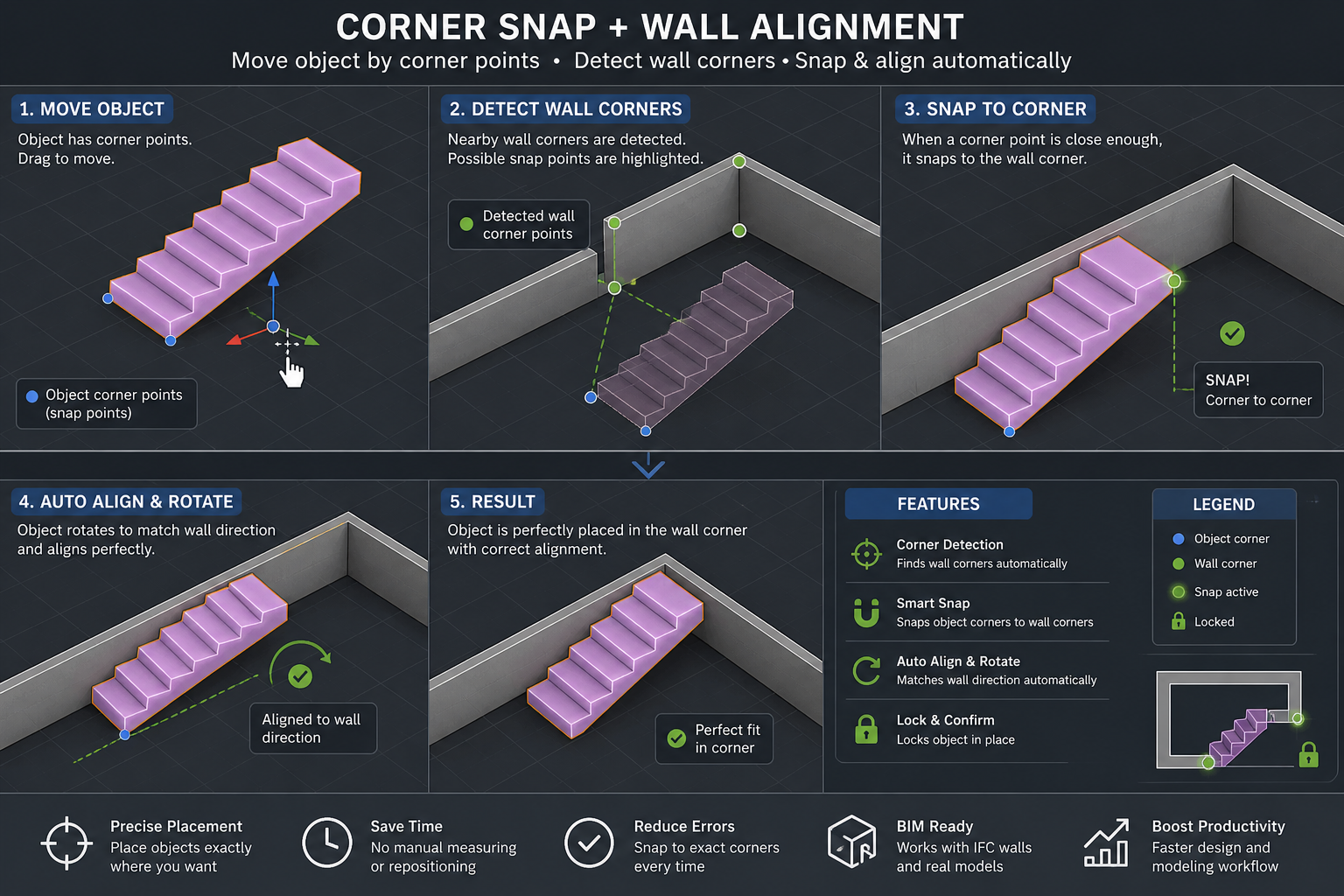
Thank you @isain for the reference.
Coming soon
Getting there, just need to squash a few remaining Claude hallucinations...
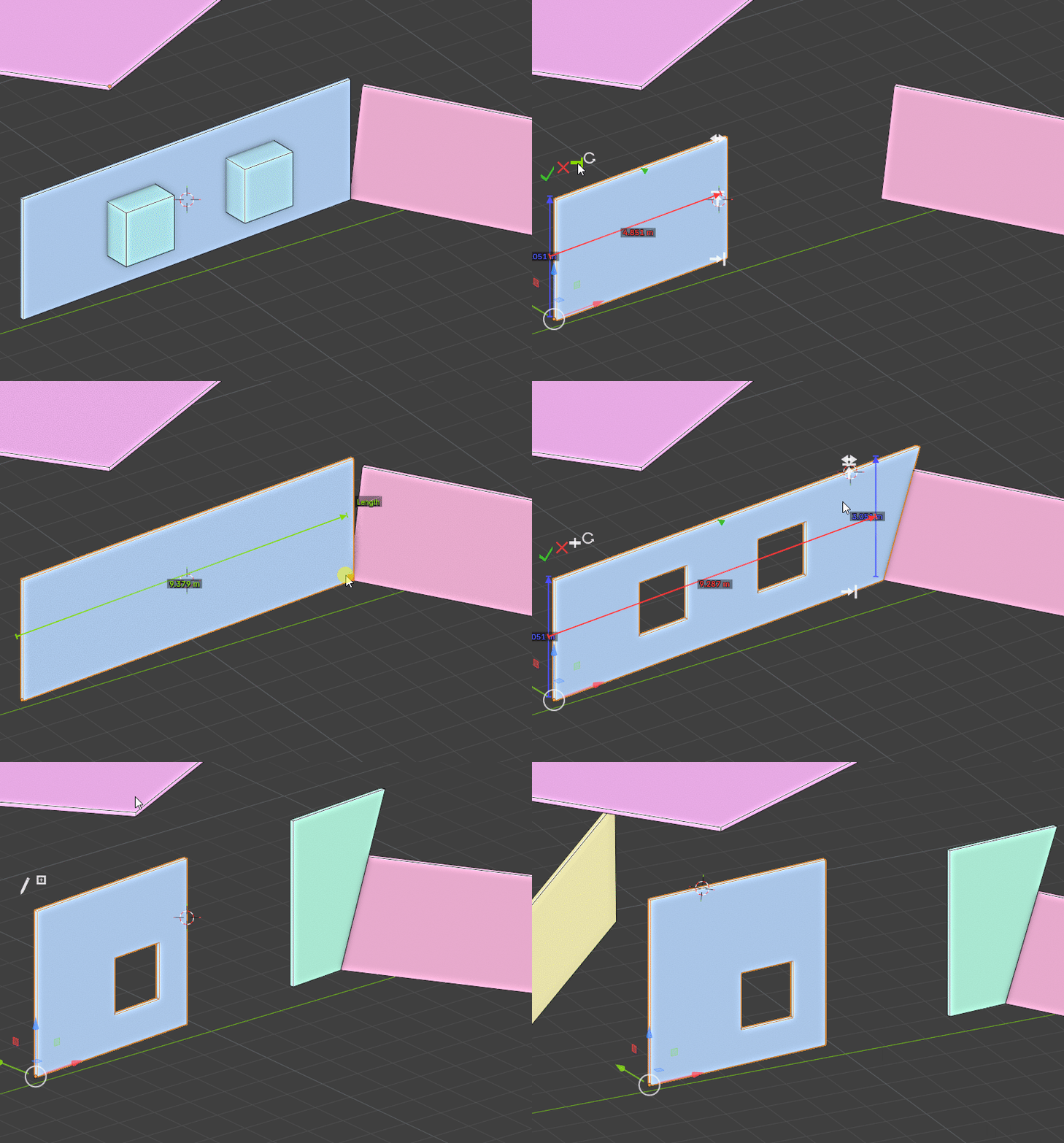
Edit : Forgot this one
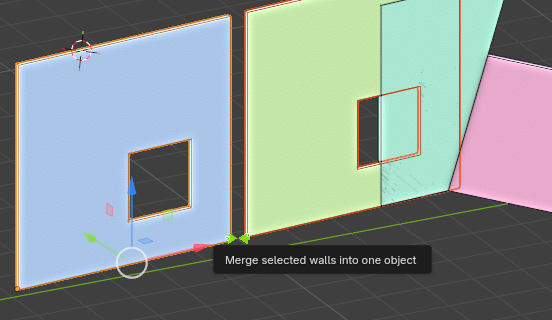
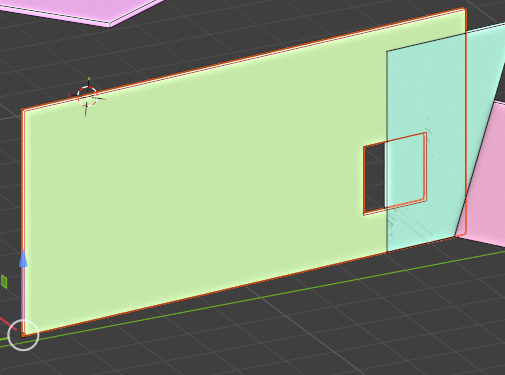
Also note @isain your first reference can already be done with vanilla blender tools, mainly by using the "B" shortcut when snapping to force origin.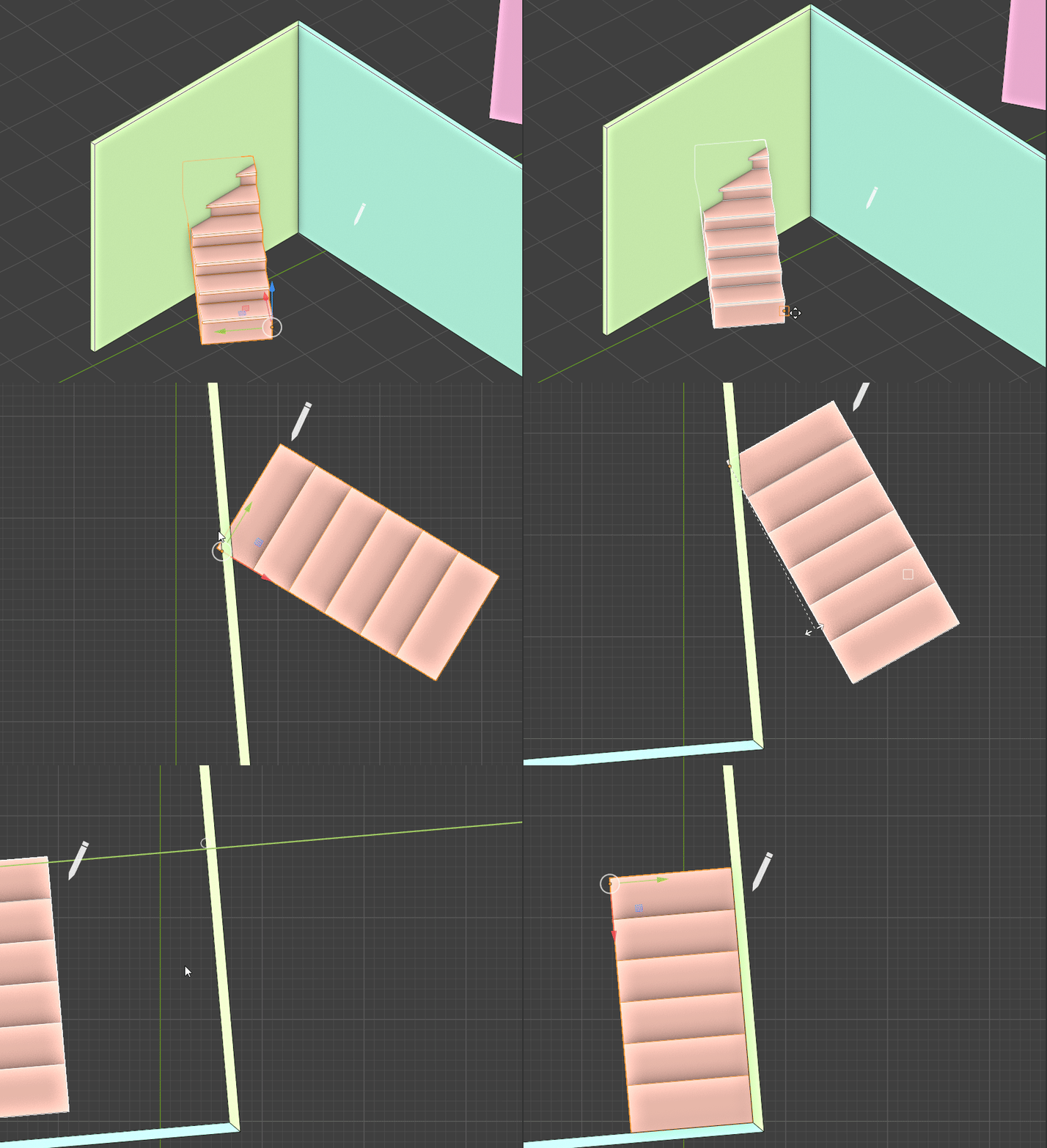
Thanks @Gorgious for info and this magnificent work
Branch is now live on dev Bonsai.
Amount of code changed is already big so I created a github issue to track further enhancements. Feel free to post comments over there for feedbacks, bug reports, feature requests. Cheers
https://github.com/IfcOpenShell/IfcOpenShell/issues/8088
Welcome to Gorgious' amusement park ! See @steverugi 's comment below :)
Damn, looks like a fun amusement park! That is absolutely fantastic.
Great work.
thanks @Gorgious !!
for those who don't want to download it ;)