Hi and thank you for accepting me in your group!
Is there a script to use only the cross-section system of the Blender-BIM add-on, within a normal .blend file?
I think that since the whole BlenderBim add-on relies on the IFC schemas and ecosystem you can't really take advantage of the tools without actual IFC elements and drawing parameters. You didn't specify what your actual needs are so it's a wild guess, but you can try out the default Bisect tool in edit mode. You can use it on multiple objects too.
(It's bugging out at the end because Suzanne's mesh is non-manifold)
Yes indeed the BlenderBIM Add-on's temporary section cutaway feature works on regular Blender meshes and actually has nothing to do with IFC. The only caveat is that it works using shader tricks, so you have to be in material preview or rendered viewport mode to see the results. It also therefore relies on normals being correct.
To create a section bounding box, just create multiple sectioning planes. All planes are independent and you can have as many or as little as you want. It might be a nice feature to build a tool where you can create a sectioning box with one click, instead of the 10 clicks it takes right now.
You may use collection boolean feature in blender 3.0, basically using whole collection as operand and simple box as cutter. While slower than shader trick, it will provide support for shadows.
Hi @Coen@Moult
You may want to try the add-on made for the atlas of anatomy: https://www.z-anatomy.com/
I got the same idea as you and tried to 'stick' (parent) six planes of these on a cube.
It worked for five of them but I never achieved to have the sixth one.
It was very close to the solution that you want, though, and I'd be glad if someone could finish it.
I should still have the file used for the experiment.
Would you like to try?
To create a section bounding box, just create multiple sectioning planes. All planes are independent and you can have as many or as little as you want.
Just curious if anyone found a workflow for modeling detailing in section boxes with BlenderBIM? for example with Revit you could select and object, hit a shortcut key and it would create a bounding box around that object which was a section box. Then the section box was the main pivot/orbit point. It's an extremely useful feature, I used it a lot.
@Coen said:
Just curious if anyone found a workflow for modeling detailing in section boxes with BlenderBIM? for example with Revit you could select and object, hit a shortcut key and it would create a bounding box around that object which was a section box. Then the section box was the main pivot/orbit point. It's an extremely useful feature, I used it a lot.
For what you want it sounds like isolating the object would work? It's a normal Blender Feature:
Press shift H with the object selected and it hides the rest of the scene
It doesn't have a section box but I think it can get you closer to that functionality
@Coen said:
Just curious if anyone found a workflow for modeling detailing in section boxes with BlenderBIM? for example with Revit you could select and object, hit a shortcut key and it would create a bounding box around that object which was a section box. Then the section box was the main pivot/orbit point. It's an extremely useful feature, I used it a lot.
For what you want it sounds like isolating the object would work? It's a normal Blender Feature:
Press shift H with the object selected and it hides the rest of the scene
It doesn't have a section box but I think it can get you closer to that functionality
I join in this reflection. I don't like shift H because it really changes the visibility status of items in the Outliner. I find the § shortcut more powerful because it isolates the selection and zooms in on it, then you can return to the previous view with the same shortcut.
It would be great to develop this shortcut to behave like Revit's HH, HI (hide/isolate selection) and HC and IC (hide/isolate all elements of the same type as the selection) shortcuts. Finally HR to redisplay everything. I use them a lot and miss them in BlenderBIM
@Coen Sure, it is called 'clipping border' and only works in 'solid viewport shading'.
Super efficient but not editable and there is no way to fill the cut.
This looks like the kind of key feature that BIM software just cannot afford to miss. I think it's somewhat sad that Dion's proposal happened 3 years ago and yet there seems that no further movements have been made towards that direction.
If you're reading this and believe that a proper clipping tool would be awesome for BlenderBIM, please register at Blender Community and upvote the idea. Now it has 87 upvotes, and the most upvoted idea has 669. Let's try to make it through the 100 barrier, every bit counts.
In addition... it might be worth to set up a bounty specifically targeted to Blender core devs.
I find it quite flattering that the Z-Anatomy solution (they gave us a shoutout at a Blender conference) and the Section Box (I assume, it looks almost identical) add-on both actually use the technique developed (and then shared on bA as an independent script) from the BlenderBIM Add-on. Clearly, they have polished it a bit more than us (offering a cube rather than a plane) and offering both mesh boolean vs shader modes. Perhaps it's time to revisit how they've upgraded it, and do more tests on speed (e.g. how does boolean based perform on huge models) and reintegrate those improvements in the BlenderBIM Add-on.
Does anybody know the Section Box creator and can help reach out?
In my experience with simple parametric models (eg elongated boxes) the "exact" boolean which is supposed to produce the best results but is also more expensive in terms of performance is OK - slow, but manageable. It does takes a toll with dense objects. The devs also added a feature some versions ago that checks for bounding box collision so if you have thousands of objects that do not intersect with your clip plane or clip box, there is next to no influence on calculations . Bounding box intersection calculations are very fast.
You'll hit other bottlenecks due to how Blender handles managing and displaying thousands of objects in the viewport alongside slow boolean calculations though.
@Moult said:
There's nothing wrong with it, but if it's not implemented, we can still do our best with workarounds and second-best implementations :)
But why spend effort on a second-best implementation, when having a closer collaboration with Blender core devs could provide so much more sinergies? Is it really a lost cause? why not setting up a bounty? I'd definitely donate for something like this...
@Gorgious said:
The devs also added a feature some versions ago [...] . Bounding box intersection calculations are very fast.
BVH? That would be great. Could you share any link with more info?
Figure this has its place here ? Playing around with a clip box system. This is not using booleans, it's using the same clipping system as the clipping plane feature, just * 6. It's real time, I think reusing the temporary caps system to "draw" a hatch in 3D is possible, for little bit less than the compute cost of bisecting real 3d. Light not make it "real" real-tiem though. I think it's shippable as is for power users to test out.
@zoomer thanks for the feedback.
It is a bit more complicated than that, in edit mode you can select hidden geometry, but you can't see that you selected it. In object mode only visible geometry is clickable so hidden objects are effectively excluded from the selection pool of objects.
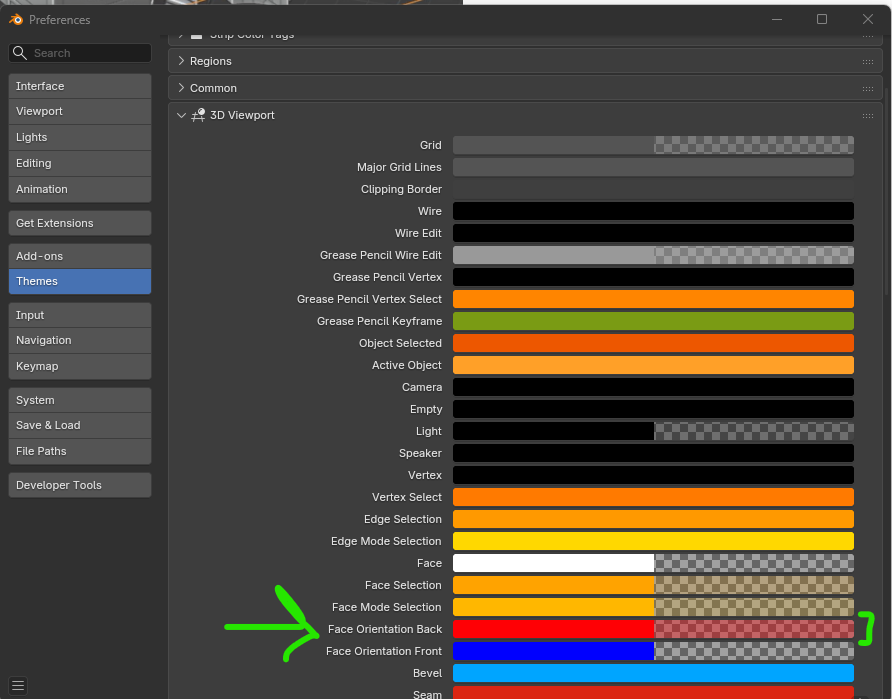
Cuts show the optional "Face Orientation" color enabled in the 3D viewport settings and editabled in the preferences's theme editor :
We are able to either close the cuts with a 3D mesh or a 3D gpu "hatch" but that would mean computing the actual geometry bisection with the 6 planes which is not computationally trivial like the clipping box system is. You can already test the feature with the "Section cutaways with cappings" system from the experimental items in the Quality and coordination panel. The cap creation is a deidcated button because it is not feasible to guarantee live preview performance with dynamic bisection of thousands of objects. Also this has a tendency to crash Blender unexpectedly.
Cheers
We are able to either close the cuts with a 3D mesh or a 3D gpu "hatch" but that would mean computing the actual geometry bisection with the 6 planes which is not computationally trivial like the clipping box system is.
The cap creation is a deidcated button because it is not feasible to guarantee live preview performance with dynamic bisection of thousands of objects. Also this has a tendency to crash Blender unexpectedly.
I see it as a drawing/modeling help if the project gets crowded. And that such a clip cube is faster to setup than by visibilities and more flexible and dynamic.
So i would have expected a cheap GPU fake thing only. These things often fail where is non-manifold geometry or overlaps and that is ok. But some kind of cut faces looks nice and helpss legibility.
If such advanced feature is needed (priorities ?) like for a rendered perspective/Isometric Section drawing where you can see inside, it may be worth to create real cut geometry from a single or more Sections. and it may take as much time as needed to compute/generate.




Comments
I think that since the whole BlenderBim add-on relies on the IFC schemas and ecosystem you can't really take advantage of the tools without actual IFC elements and drawing parameters. You didn't specify what your actual needs are so it's a wild guess, but you can try out the default Bisect tool in edit mode. You can use it on multiple objects too.
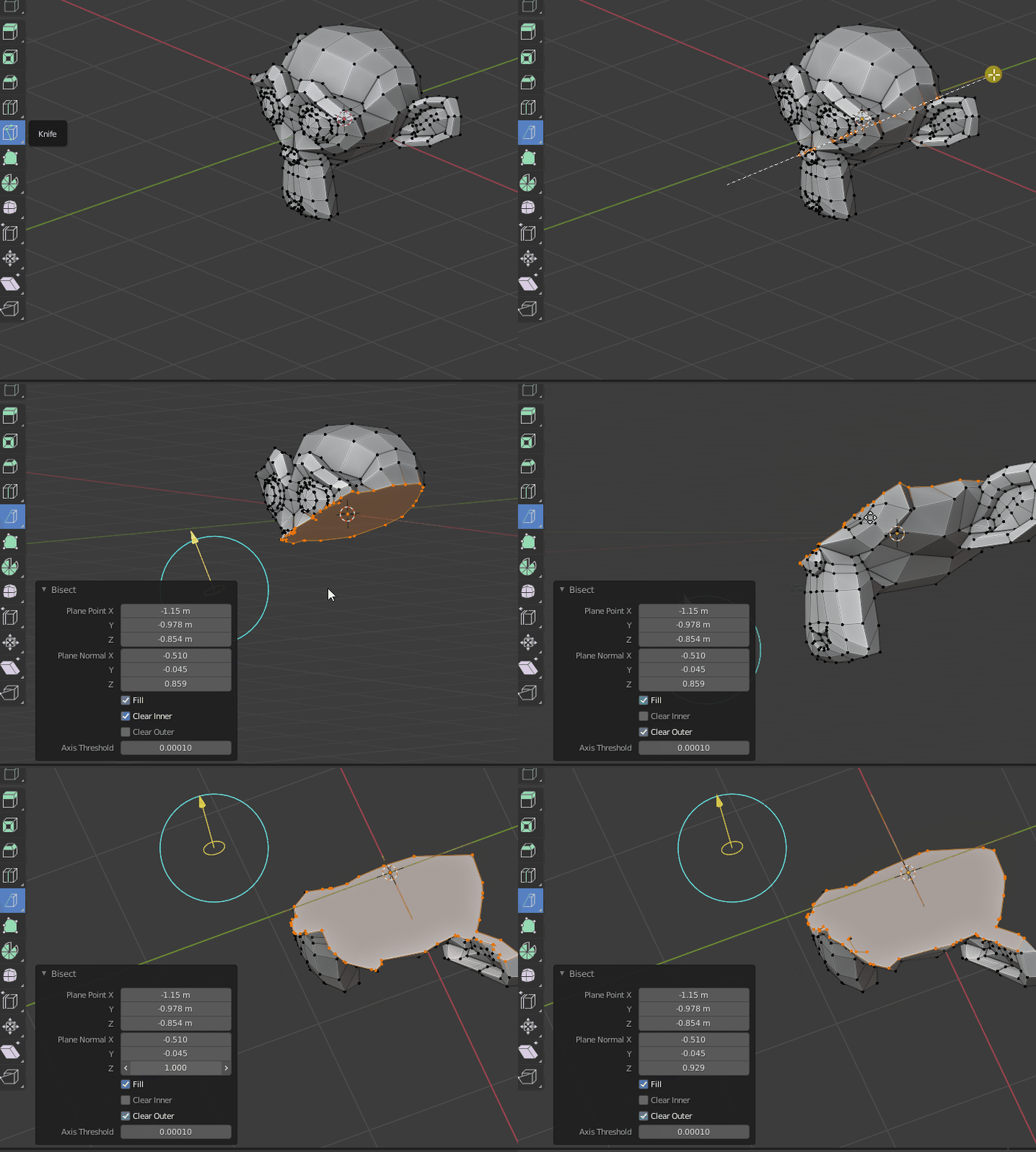
(It's bugging out at the end because Suzanne's mesh is non-manifold)
Is it possible to select and object, which creates a sectioning Bounding Box around the object?
Yes indeed the BlenderBIM Add-on's temporary section cutaway feature works on regular Blender meshes and actually has nothing to do with IFC. The only caveat is that it works using shader tricks, so you have to be in material preview or rendered viewport mode to see the results. It also therefore relies on normals being correct.
To create a section bounding box, just create multiple sectioning planes. All planes are independent and you can have as many or as little as you want. It might be a nice feature to build a tool where you can create a sectioning box with one click, instead of the 10 clicks it takes right now.
You may use collection boolean feature in blender 3.0, basically using whole collection as operand and simple box as cutter. While slower than shader trick, it will provide support for shadows.
@Moult
Has there been any progress so far? :-)
Hi @Coen @Moult
You may want to try the add-on made for the atlas of anatomy:
https://www.z-anatomy.com/
I got the same idea as you and tried to 'stick' (parent) six planes of these on a cube.
It worked for five of them but I never achieved to have the sixth one.
It was very close to the solution that you want, though, and I'd be glad if someone could finish it.
I should still have the file used for the experiment.
Would you like to try?
Did you ever achieve to use more than 5?
Just curious if anyone found a workflow for modeling detailing in section boxes with BlenderBIM? for example with Revit you could select and object, hit a shortcut key and it would create a bounding box around that object which was a section box. Then the section box was the main pivot/orbit point. It's an extremely useful feature, I used it a lot.
For what you want it sounds like isolating the object would work? It's a normal Blender Feature:

Press shift H with the object selected and it hides the rest of the scene
It doesn't have a section box but I think it can get you closer to that functionality
Thanks, I know about al+H. It's useful, but someone here describes it exactly as I want:
https://blender.community/c/rightclickselect/W3fbbc/?sorting=hot
@Coen hehe I think you know that "someone" :)
I join in this reflection. I don't like shift H because it really changes the visibility status of items in the Outliner. I find the § shortcut more powerful because it isolates the selection and zooms in on it, then you can return to the previous view with the same shortcut.
It would be great to develop this shortcut to behave like Revit's HH, HI (hide/isolate selection) and HC and IC (hide/isolate all elements of the same type as the selection) shortcuts. Finally HR to redisplay everything. I use them a lot and miss them in BlenderBIM
There is this add-on that I saw the other day, but I didn't get to test it:

Anyone any experience modeling with alt+b to create sections?
@Coen Sure, it is called 'clipping border' and only works in 'solid viewport shading'.
Super efficient but not editable and there is no way to fill the cut.
Another addon:
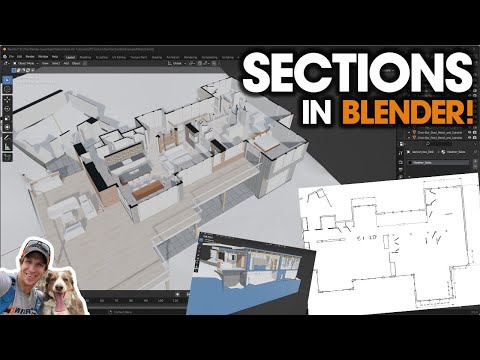
Section Box
This looks like the kind of key feature that BIM software just cannot afford to miss. I think it's somewhat sad that Dion's proposal happened 3 years ago and yet there seems that no further movements have been made towards that direction.
If you're reading this and believe that a proper clipping tool would be awesome for BlenderBIM, please register at Blender Community and upvote the idea. Now it has 87 upvotes, and the most upvoted idea has 669. Let's try to make it through the 100 barrier, every bit counts.
In addition... it might be worth to set up a bounty specifically targeted to Blender core devs.
I find it quite flattering that the Z-Anatomy solution (they gave us a shoutout at a Blender conference) and the Section Box (I assume, it looks almost identical) add-on both actually use the technique developed (and then shared on bA as an independent script) from the BlenderBIM Add-on. Clearly, they have polished it a bit more than us (offering a cube rather than a plane) and offering both mesh boolean vs shader modes. Perhaps it's time to revisit how they've upgraded it, and do more tests on speed (e.g. how does boolean based perform on huge models) and reintegrate those improvements in the BlenderBIM Add-on.
Does anybody know the Section Box creator and can help reach out?
What's wrong with the right-click-select idea exactly as you proposed it 3y ago?
There's nothing wrong with it, but if it's not implemented, we can still do our best with workarounds and second-best implementations :)
In my experience with simple parametric models (eg elongated boxes) the "exact" boolean which is supposed to produce the best results but is also more expensive in terms of performance is OK - slow, but manageable. It does takes a toll with dense objects. The devs also added a feature some versions ago that checks for bounding box collision so if you have thousands of objects that do not intersect with your clip plane or clip box, there is next to no influence on calculations . Bounding box intersection calculations are very fast.
You'll hit other bottlenecks due to how Blender handles managing and displaying thousands of objects in the viewport alongside slow boolean calculations though.
But why spend effort on a second-best implementation, when having a closer collaboration with Blender core devs could provide so much more sinergies? Is it really a lost cause? why not setting up a bounty? I'd definitely donate for something like this...
BVH? That would be great. Could you share any link with more info?
I can't find the patch but Howard Trickey is the person you want to talk to (or stalk commits) if you want more information. :)
This is far, far beyond my area of expertise so I won't be able to offer much information on the topic :p
I'd love for this to be done in Blender core but not sure exactly how. Maybe @erik85 knows?
Figure this has its place here ? Playing around with a clip box system. This is not using booleans, it's using the same clipping system as the clipping plane feature, just * 6. It's real time, I think reusing the temporary caps system to "draw" a hatch in 3D is possible, for little bit less than the compute cost of bisecting real 3d. Light not make it "real" real-tiem though. I think it's shippable as is for power users to test out.
That's a gorgeous feature !
At least to comfortably check and examine your 3D Model.
Is it also usable for modeling. E.g. not allowing to accidentally editing hidden geometry you can't see.
If I see that correct, it does not create Faces to close the cuts (to be realtime) but it optionally shows a color for all inner Faces ?
@zoomer thanks for the feedback.
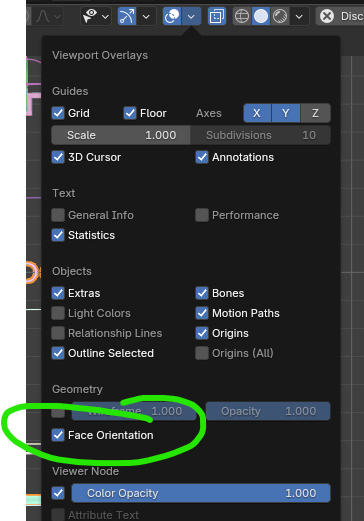
It is a bit more complicated than that, in edit mode you can select hidden geometry, but you can't see that you selected it. In object mode only visible geometry is clickable so hidden objects are effectively excluded from the selection pool of objects.
Cuts show the optional "Face Orientation" color enabled in the 3D viewport settings and editabled in the preferences's theme editor :
We are able to either close the cuts with a 3D mesh or a 3D gpu "hatch" but that would mean computing the actual geometry bisection with the 6 planes which is not computationally trivial like the clipping box system is. You can already test the feature with the "Section cutaways with cappings" system from the experimental items in the Quality and coordination panel. The cap creation is a deidcated button because it is not feasible to guarantee live preview performance with dynamic bisection of thousands of objects. Also this has a tendency to crash Blender unexpectedly.
Cheers
@Gorgious the system for creating drawings in Bonsai has a similar box model, it would be great to be able to edit drawing extents like this
I see it as a drawing/modeling help if the project gets crowded. And that such a clip cube is faster to setup than by visibilities and more flexible and dynamic.
So i would have expected a cheap GPU fake thing only. These things often fail where is non-manifold geometry or overlaps and that is ok. But some kind of cut faces looks nice and helpss legibility.
If such advanced feature is needed (priorities ?) like for a rendered perspective/Isometric Section drawing where you can see inside, it may be worth to create real cut geometry from a single or more Sections. and it may take as much time as needed to compute/generate.