I presented ifcgit yesterday at work as part of a 'show your hobby project' to about ~40 people mainly software developers. To people who don't know what IFC is. The presentation was recorded and I showed feature branching and ifc git merging. I just looked back at the recorded presentation and I think I definitely need to work on my presentation skills ?. I forgot to mention a lot of details,talked too fast and got a lot of confused looks. The only question I got was how to 3D visualize a merge conflict. However I was quite relieved the ifc merge worked in the live demo.
The screencast is 75 minutes long, if we had more time it could have been shorter. Thanks to everyone who joined-in, IFC Git is a collaboration tool above all:
@brunopostle said:
Yes, thanks to help from @bruno_perdigao add-on has been moved into BlenderBIM, so if you have the old add-on installed you should uninstall it.
However we still have no way of shipping the git executable with BlenderBIM, so you do need to install this separately. On a Linux system you probably don't have to do anything, but on Windows you need to download git ( @Ace you don't need to do anything, you already have it). Similarly, if you want to use the experimental merge functionality, you need ifcmerge in your PATH, windows executable downloadable from here: https://github.com/brunopostle/ifcmerge/releases/tag/2022-06-20
@brunopostle Bruno for Windows downloading Git is still a requirement right?
@Ace said: @brunopostle Bruno for Windows downloading Git is still a requirement right?
Yes, I originally thought we might be able to do it all with the python git implementation, but we need the full git tool. I need to do some Windows instructions, including ssh keys for GitHub etc..
[Updated] setting up Git collaboration in BlenderBIM
Git support is built-into BlenderBIM, but some extra tools are needed to use it.
Install Git
On Linux you probably already have Git installed through your package manager. On Windows, download and install from the Git website; or install it using winget, using the cmd.exe command-line (hit the Windows key and type cmd):
winget install --id Git.Git -e --source winget
You may have to logout and log-in again
Install ifcmerge
On Linux, just download the ifcmerge script, put it in your PATH, ie. in ~/.local/bin and make it executable:
chmod +x ~/.local/bin/ifcmerge
Windows users, download and unzip the ifcmerge.exe file, and put it somewhere in your %PATH%. A good place to put it is in the same folder as git.exe, find out where this is using this command-line:
where git
Github
Git-forges can use all sorts of access methods, but Github requires you to use ssh encryption and authentication, you will need to generate an ssh-key (with no password) and upload it to your Github account, you will also need to add the Github key to your known_hosts file.
On Windows the Git tool installed earlier has everything you need, launch the Git Gui tool, select Help > Show SSH Key, then Generate Key (if you don't already have one) and paste this text into your Github account preferences. To add Github to your known_hosts file, launch the Git Bash tool (which is a command-line like cmd.exe), and briefly connect to the Github servers:
ssh github.com
This will ask you if you want to add their key (fingerprint SHA256:p2QAMXNIC1TJYWeIOttrVc98/R1BUFWu3/LiyKgUfQM) to your known_hosts, type yes and exit since you don't have permission to do anything else.
This is really great guys!
However I am running into the following error when trying to do an initial Git commit on Windows 10 (Blender v4.3.2 Bonsai v0.8.0).
When I try to add an existing IFC project file to the BlenderBIM/Bonsai initiated Git repo I get this: ValueError: Absolute path 'C:/Users/Marius/OneDrive/_Renovation/IFCs/Kantershof_386_FIXED_Copy.ifc' is not in git repository at 'C:\\Users\\Marius\\OneDrive\\_Renovation\\IFCs'
I can Git add the IFC project file, and make the initial Git commit from the Command Prompt without any issues.
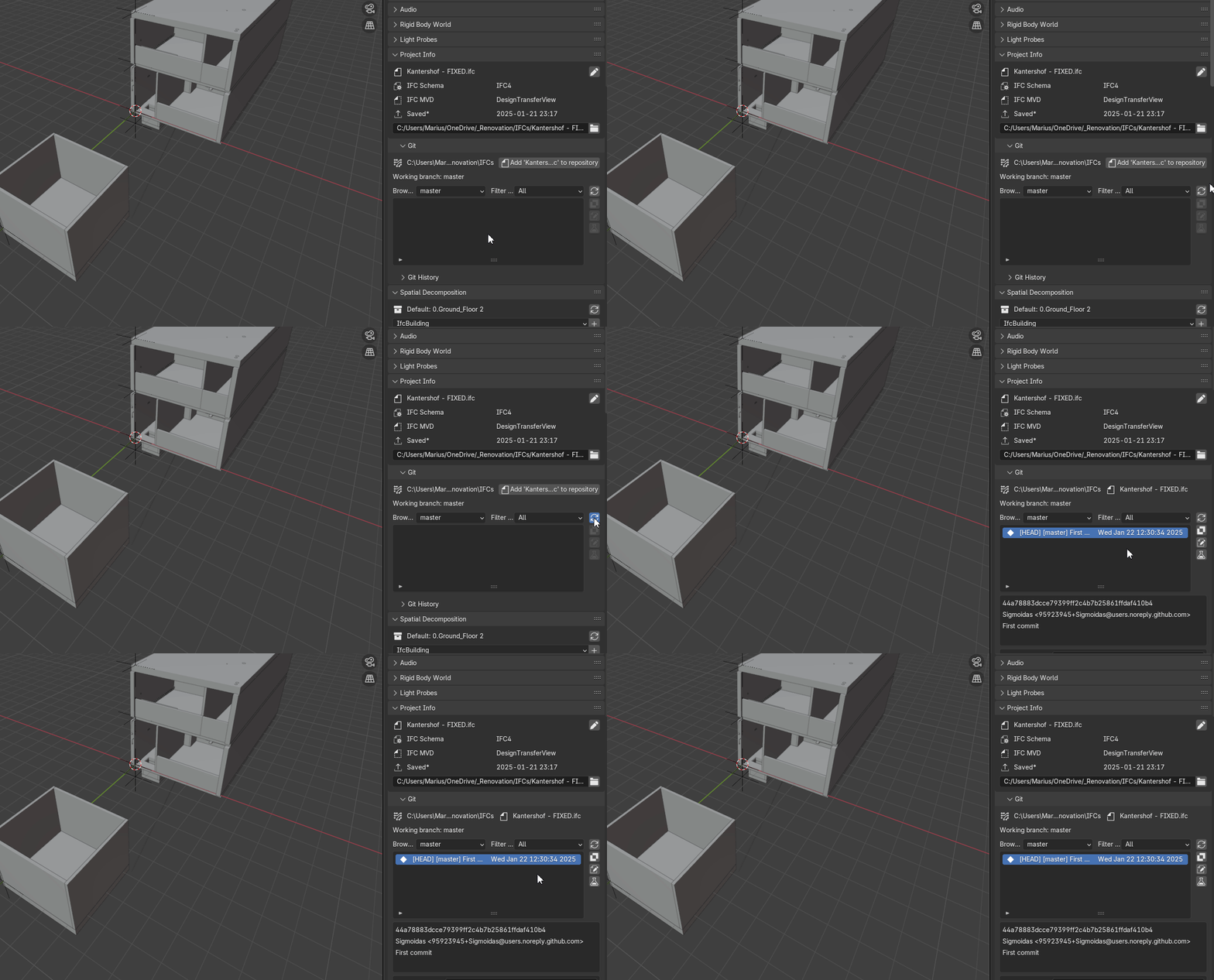
The Command Prompt Git commit does show up in BlenderBIM/Bonsai after the "Refresh revision list" button is clicked.
Does anyone have any pointers how to fix this Git add Absolute path issue, as of course it would be lot handier to have this all in Blender UI instead of having to move to Command Prompt back and forward. Thanks!
..also there have been a couple of changes to the git functionality in the latest snapshots:
ifcmerge now ships with Bonsai, so you shouldn't have to install it separately to be able to merge branches.
On windows there is a button where you can try to install Git using winget and the Microsoft Store (the button only appears when you don't have Git). It would be nice to have reports of success or failure. It should be removed if it causes too much trouble.
@brunopostle said: @Armatura can you commit changes to this file once it has been added to the repository?
I get the same errors as with the Innitial CommitValueError: Absolute path 'C:/Users/Marius/OneDrive/_Renovation/IFCs/Kantershof_386_FIXED_Copy.ifc' is not in git repository at 'C:\\Users\\Marius\\OneDrive\\_Renovation\\IFCs'
Mind you, if I load a new IFC Project from a Demo template, the Bonsai Git UI works fine.
@brunopostle said:
..also there have been a couple of changes to the git functionality in the latest snapshots:
ifcmerge now ships with Bonsai, so you shouldn't have to install it separately to be able to merge branches.
On windows there is a button where you can try to install Git using winget and the Microsoft Store (the button only appears when you don't have Git). It would be nice to have reports of success or failure. It should be removed if it causes too much trouble.
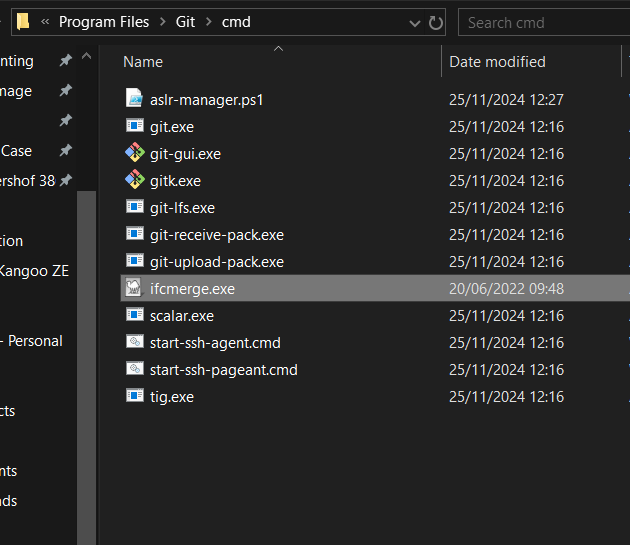
So theifcmerge.exe should removed from .\Git\cmd directory?
@Armatura I don't know what the problem is, it shouldn't be an issue with OneDrive, but it is worth checking to see if it works outside of a OneDrive folder. I'll have a look in the code and see if these paths are normalised before being passed to git.
Yes you can remove the ifcmerge.exe from the git installation folder, the version in Bonsai is more up to date with some minor fixes.
@brunopostle said: @Armatura I don't know what the problem is, it shouldn't be an issue with OneDrive, but it is worth checking to see if it works outside of a OneDrive folder. I'll have a look in the code and see if these paths are normalised before being passed to git.
Yes you can remove the ifcmerge.exe from the git installation folder, the version in Bonsai is more up to date with some minor fixes.
I think trying another folder in C:\Users\....\Documents\ via the Bonsai UI initial commit was one of the first things I tried while troubleshooting, and it throws the same error.
The fact that it works fine with a fresh IFC project made from the "IFC4 Demo Template" points towards my IFC file having issues, but how can it then affect the Absolute/Relative path interpretation of Bonsai UI Git is beyond me.
And just like that, after purging the unused types & profiles, as well as moving all the objects to correct collections (Some objects were assigned to some random collection) in the Outliner, the Git started to work. I was able to Create the Repo, add the IFC file to it and commit it without any errors.
ValueError: Absolute path 'C:/Users/Marius/OneDrive/_Renovation/IFCs/Kantershof_386_FIXED_Copy.ifc' is not in git repository at 'C:\\Users\\Marius\\OneDrive\\_Renovation\\IFCs'
Somehow, and I don't know how, this means that blender has supplied the file path with / folder separators when it should everywhere be \\ on Windows. Can you remember how you got the IFC file in Bonsai? was it double-clicking on an IFC file? the File > Open menu? or creating a new file and saving it?
@brunopostle said:
ValueError: Absolute path 'C:/Users/Marius/OneDrive/_Renovation/IFCs/Kantershof_386_FIXED_Copy.ifc' is not in git repository at 'C:\Users\Marius\OneDrive\_Renovation\IFCs'
Somehow, and I don't know how, this means that blender has supplied the file path with / folder separators when it should everywhere be \\ on Windows. Can you remember how you got the IFC file in Bonsai? was it double-clicking on an IFC file? the File > Open menu? or creating a new file and saving it?
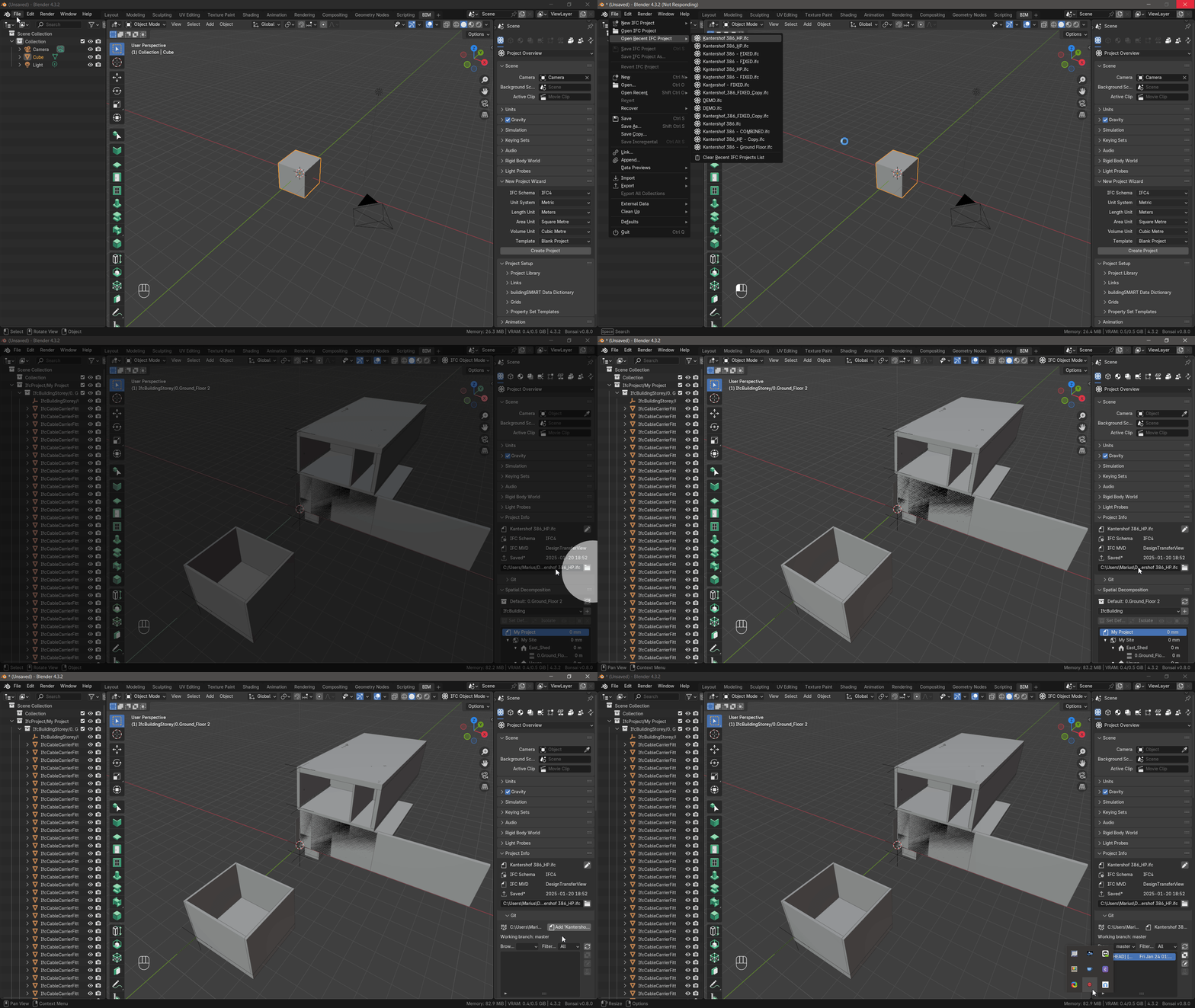
I always get confused with these directory/path slash/backslash conventions for different OSs. But you are right, the path should be with "\" instead of "/" in Project Info IFC file path field, and then Bonsai Git UI works without a glitch. Still seems like some bug that Blender initially loads the IFC file path with "\".
Thanks, so if you open from the Recent Files list, the path is stored with / separators (which is wrong on Windows), but if you use File Open then it uses \\ (which is correct on Windows).
@brunopostle said:
Thanks, so if you open from the Recent Files list, the path is stored with / separators (which is wrong on Windows), but if you use File Open then it uses \\ (which is correct on Windows).
Not really.
Opening the IFC file via File -> Open IFC Project or File -> Open Recent IFC Project results in / separators.
Only when one loads the IFC file via the Bonsai UI Project Info directory field, does the separators switch to \ and allow Bonsai Git UI to add the IFC project file into to the Repo. You can see this moment, when the in the / switches to \ in GIF screen recording above.
A Blender add-on module (754 lines) that gives IfcOpenShell/Bonsai a UI panel for using git with IFC files. It wraps GitPython to let users commit, branch, diff, and merge IFC files directly from inside Blender. It's the backend tool layer for the IfcGit panel in Bonsai — UI-driven, Blender-dependent, no standalone use.
ifcmerge — Three-way IFC merge tool
A standalone CLI tool (written in Rust) that performs a three-way merge of IFC files — the same concept as git mergetool. You run it as:
It's designed to be registered as git's mergetool so that git mergetool calls it automatically during branch conflicts. It's git-adjacent but not git-aware — it only handles the merge algorithm itself.
ifc-commit — Git-native IFC workflow CLI
A Python CLI (ifccommit.py) that treats IFC files like source code artifacts in a git repo. It provides composable operations (extract, insert, replace, split, diff, move, copy) and embeds git metadata (commit hashes) directly into the IFC file via IfcOwnerHistory. It also has a pipeline/automation layer and a web app. It's more of a workflow orchestration tool — came out of the Porto OpenBIM Hackathon 2026.
Summary of roles
What it is
Who uses it
Git relationship
ifcgit.py
Bonsai/Blender UI panel
Blender users
Wraps git via GitPython
ifcmerge
3-way merge algorithm
git mergetool
Invoked by git on conflicts
ifc-commit
IFC workflow CLI + pipelines
CLI / CI users
Orchestrates git commits
They're complementary — ifcmerge solves merge conflicts, ifcgit.py gives a GUI for the git workflow, and ifc-commit automates the pipeline and embeds provenance.
Does ifc-commit overlap with the others, or is it complementary?
Overlaps (minor)
ifc-commit diff vs ifcgit.py diff
Both expose a diff between two IFC states, but they're doing very different things. ifcgit.py delegates to git's own line diff on the STEP text (meaning it shows changed STEP lines between commits). ifc-commit diff does a semantic diff — comparing entity IDs and placement coordinates directly in memory. They overlap in intent but not in mechanism, and neither replaces the other.
ifc-commit insert/replace vs ifcmerge
Both involve combining IFC files, which can look similar on the surface. But ifc-commit's merges are additive/compositional — taking discipline extracts and reassembling them. ifcmerge does a three-way conflict-aware merge — it resolves concurrent edits to the same elements. These are fundamentally different problems. No real overlap.
Complementary (substantial)
The three tools actually cover distinct layers of a complete git-native BIM workflow:
Layer
Tool
What it does
Conflict resolution
ifcmerge
Resolves concurrent edits to the same elements
Author UI
ifcgit.py
Gives Blender users a git panel (commit, branch, checkout)
Pipeline / provenance
ifc-commit
Decomposes/recomposes models by storey/space/type, stamps Pset_GitCommit on touched elements
The most interesting integration point is ifc-commit's Pset_GitCommit provenance — stamping CommitHash, CommitAuthor, CommitBranch directly onto each touched element as a standard IFC property set. Neither ifcmerge nor ifcgit.py does this. That metadata survives round-trips through Revit/ArchiCAD, which makes it a genuinely additive capability.
A realistic combined workflow would be:
ifc-commit pipelines decompose the model by discipline/storey, teams work in parallel branches
ifcmerge resolves conflicts when those branches merge
ifcgit.py gives Blender authors a UI for all of the above without leaving Blender
ifcmerge is strictly for Native IFC tools like Bonsai, but this ifc-commit tool is designed for a Open BIM world (where disciplines are sharing exported IFC snapshots, and which is a bigger world for sure)


Comments
I presented ifcgit yesterday at work as part of a 'show your hobby project' to about ~40 people mainly software developers. To people who don't know what IFC is. The presentation was recorded and I showed feature branching and ifc git merging. I just looked back at the recorded presentation and I think I definitely need to work on my presentation skills ?. I forgot to mention a lot of details,talked too fast and got a lot of confused looks. The only question I got was how to 3D visualize a merge conflict. However I was quite relieved the ifc merge worked in the live demo.
@Coen Well done!
I enjoyed the meeting yesterday, for people who are interested, the git history of what we did yesterday.
https://github.com/C-Claus/ifc-demo/compare/master...brunopostle:ifc-demo:master
I'll upload the screencast soon, here is the fork/branch/merge history (note four authors):
Ah damn I missed it, great job!
The screencast is 75 minutes long, if we had more time it could have been shorter. Thanks to everyone who joined-in, IFC Git is a collaboration tool above all:
https://youtube.com/live/cJZhSCSSWdA
@brunopostle Bruno for Windows downloading Git is still a requirement right?
Yes, I originally thought we might be able to do it all with the python git implementation, but we need the full git tool. I need to do some Windows instructions, including ssh keys for GitHub etc..
[Updated] setting up Git collaboration in BlenderBIM
Git support is built-into BlenderBIM, but some extra tools are needed to use it.
Install Git
On Linux you probably already have Git installed through your package manager. On Windows, download and install from the Git website; or install it using winget, using the
cmd.execommand-line (hit the Windows key and typecmd):You may have to logout and log-in again
Install ifcmerge
On Linux, just download the
ifcmergescript, put it in yourPATH, ie. in~/.local/binand make it executable:Windows users, download and unzip the
ifcmerge.exefile, and put it somewhere in your%PATH%. A good place to put it is in the same folder asgit.exe, find out where this is using this command-line:Github
Git-forges can use all sorts of access methods, but Github requires you to use ssh encryption and authentication, you will need to generate an ssh-key (with no password) and upload it to your Github account, you will also need to add the Github key to your
known_hostsfile.On Windows the Git tool installed earlier has everything you need, launch the Git Gui tool, select Help > Show SSH Key, then Generate Key (if you don't already have one) and paste this text into your Github account preferences. To add Github to your
known_hostsfile, launch the Git Bash tool (which is a command-line likecmd.exe), and briefly connect to the Github servers:This will ask you if you want to add their key (fingerprint
SHA256:p2QAMXNIC1TJYWeIOttrVc98/R1BUFWu3/LiyKgUfQM) to yourknown_hosts, typeyesand exit since you don't have permission to do anything else.It can't find the
gittool. Once Git has been installed, you will need to restart Blender and maybe even log out of Windows and log in again.Can you check if Blender can find Git? in the blender Python Console type these commands:
This is really great guys!
However I am running into the following error when trying to do an initial Git commit on Windows 10 (Blender v4.3.2 Bonsai v0.8.0).
When I try to add an existing IFC project file to the BlenderBIM/Bonsai initiated Git repo I get this:
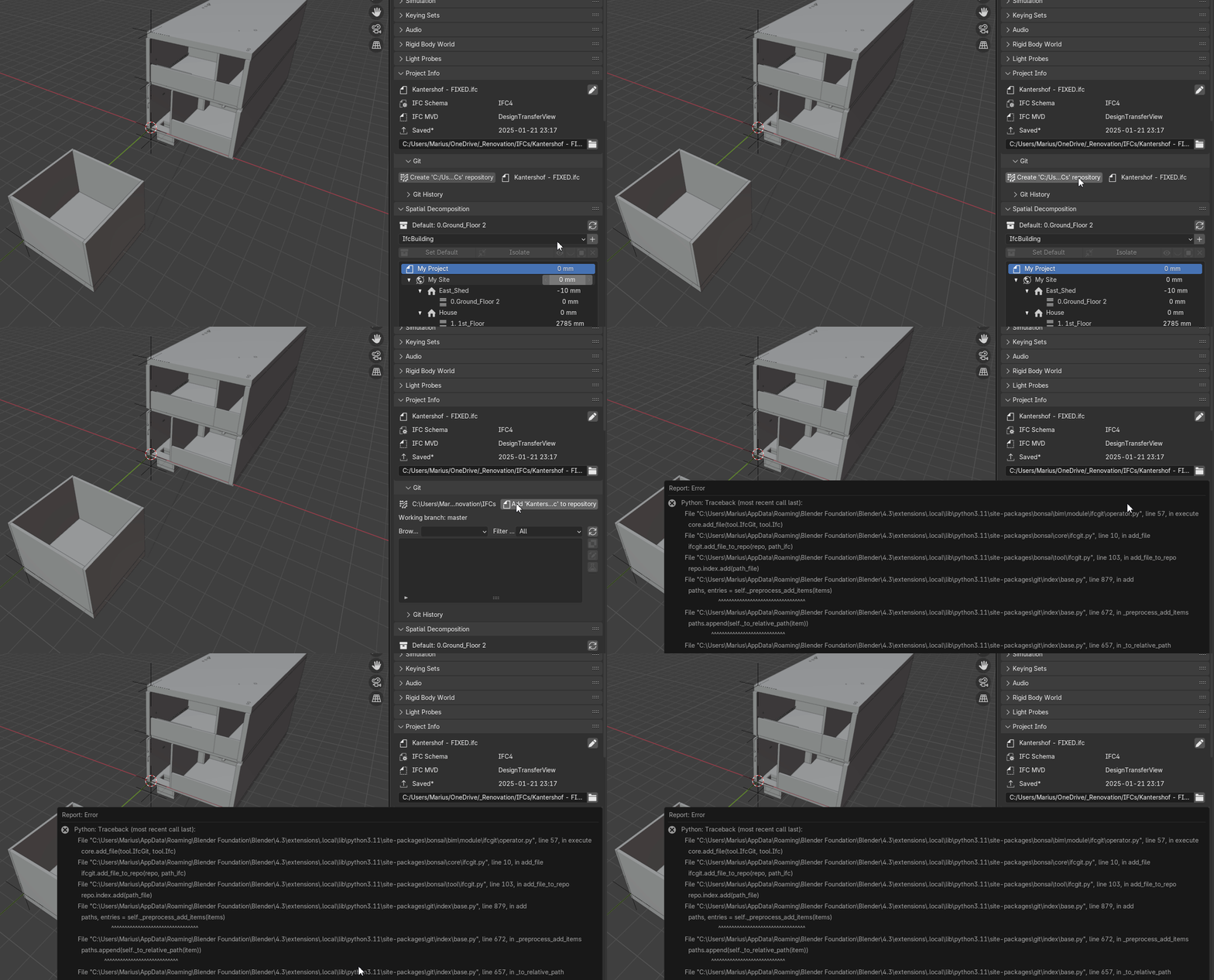
ValueError: Absolute path 'C:/Users/Marius/OneDrive/_Renovation/IFCs/Kantershof_386_FIXED_Copy.ifc' is not in git repository at 'C:\\Users\\Marius\\OneDrive\\_Renovation\\IFCs'I can Git add the IFC project file, and make the initial Git commit from the Command Prompt without any issues.
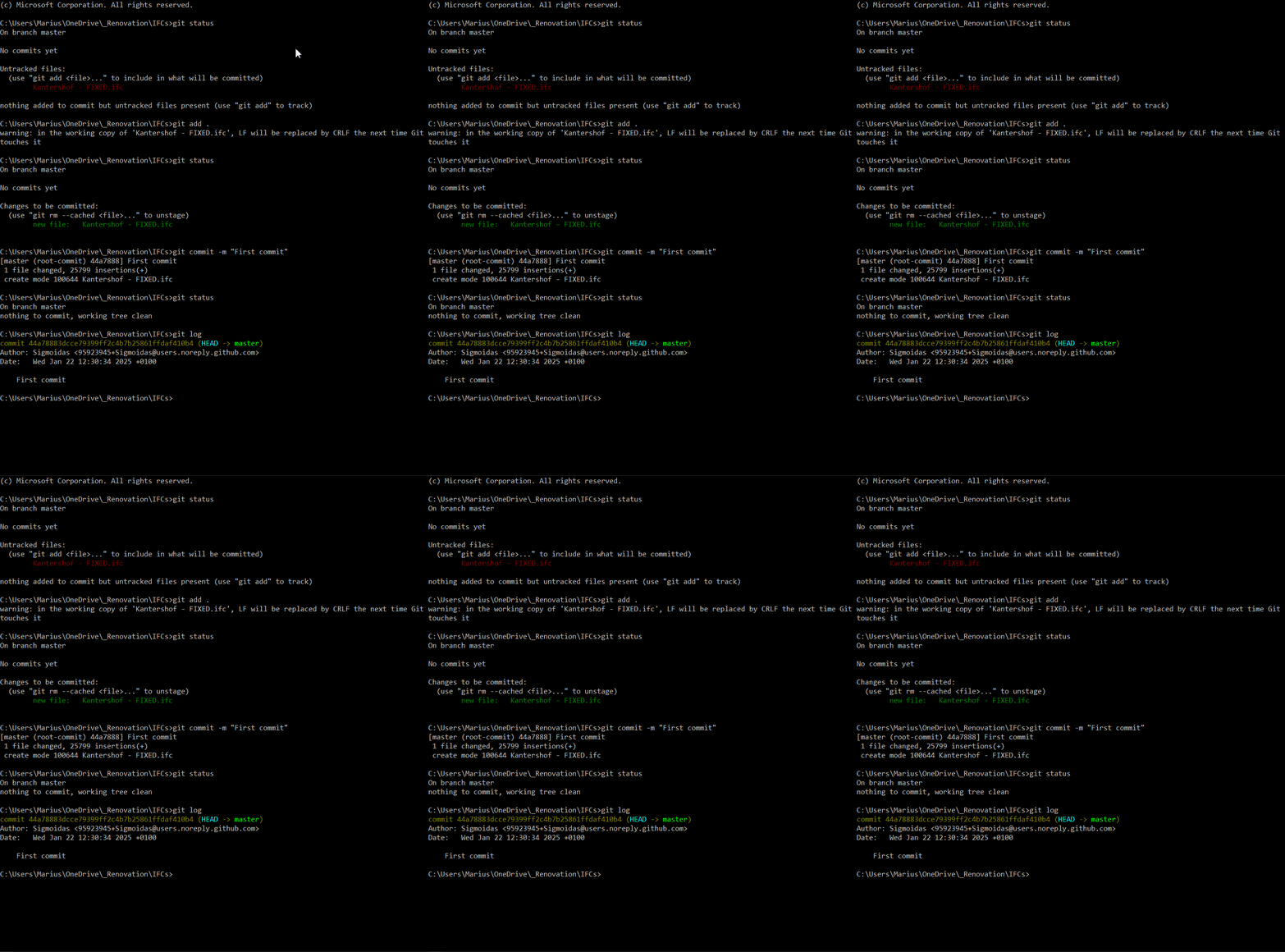
The Command Prompt Git commit does show up in BlenderBIM/Bonsai after the "Refresh revision list" button is clicked.
Does anyone have any pointers how to fix this Git add
Absolute pathissue, as of course it would be lot handier to have this all in Blender UI instead of having to move to Command Prompt back and forward. Thanks!@Armatura can you commit changes to this file once it has been added to the repository?
..also there have been a couple of changes to the git functionality in the latest snapshots:
I get the same errors as with the Innitial Commit
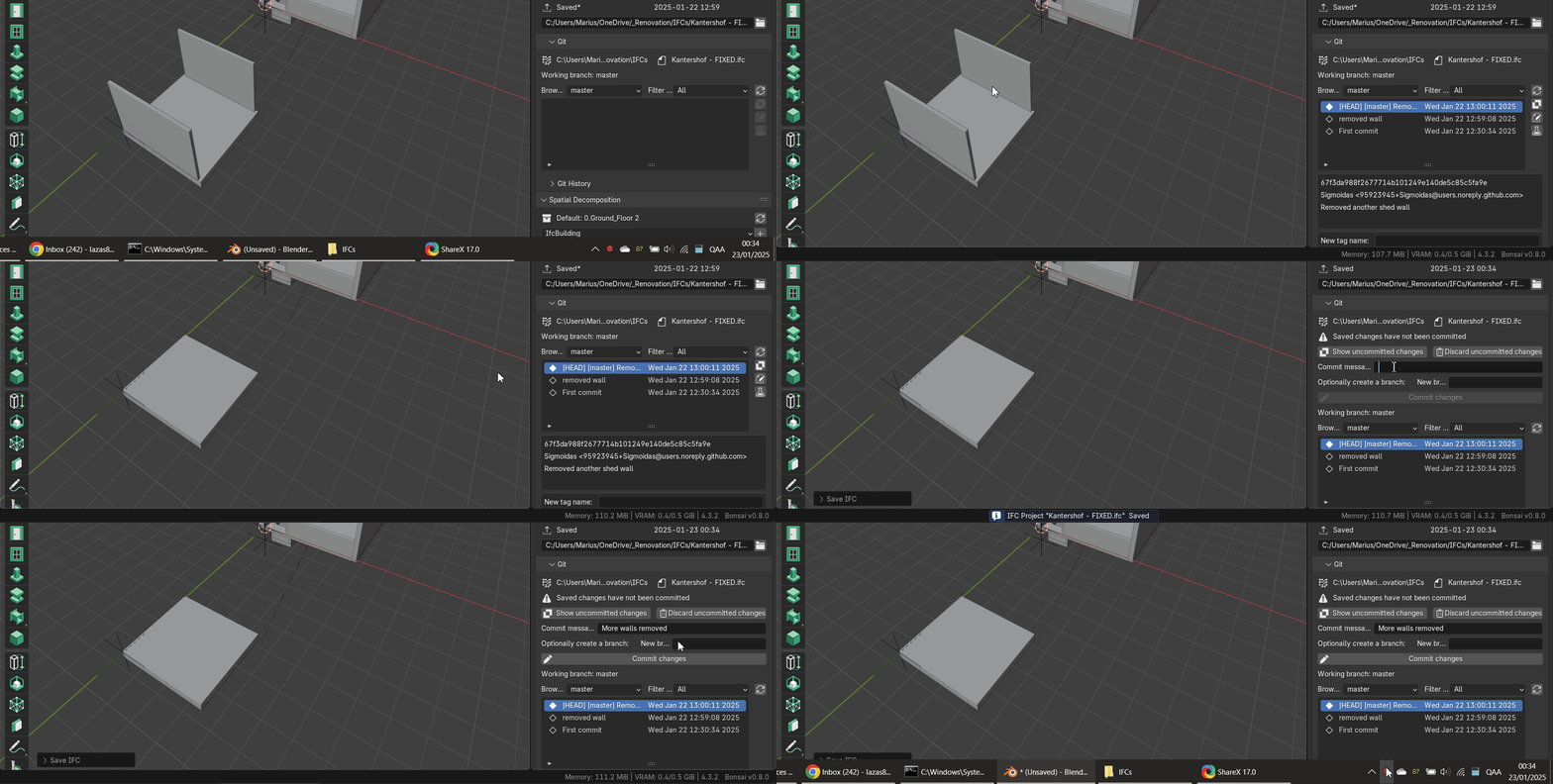
ValueError: Absolute path 'C:/Users/Marius/OneDrive/_Renovation/IFCs/Kantershof_386_FIXED_Copy.ifc' is not in git repository at 'C:\\Users\\Marius\\OneDrive\\_Renovation\\IFCs'Mind you, if I load a new IFC Project from a Demo template, the Bonsai Git UI works fine.
So the
ifcmerge.exeshould removed from.\Git\cmddirectory?@Armatura I don't know what the problem is, it shouldn't be an issue with OneDrive, but it is worth checking to see if it works outside of a OneDrive folder. I'll have a look in the code and see if these paths are normalised before being passed to git.
Yes you can remove the ifcmerge.exe from the git installation folder, the version in Bonsai is more up to date with some minor fixes.
I think trying another folder in
C:\Users\....\Documents\via the Bonsai UI initial commit was one of the first things I tried while troubleshooting, and it throws the same error.The fact that it works fine with a fresh IFC project made from the "IFC4 Demo Template" points towards my IFC file having issues, but how can it then affect the Absolute/Relative path interpretation of Bonsai UI Git is beyond me.
And just like that, after purging the unused types & profiles, as well as moving all the objects to correct collections (Some objects were assigned to some random collection) in the Outliner, the Git started to work. I was able to Create the Repo, add the IFC file to it and commit it without any errors.
Somehow, and I don't know how, this means that blender has supplied the file path with
/folder separators when it should everywhere be\\on Windows. Can you remember how you got the IFC file in Bonsai? was it double-clicking on an IFC file? the File > Open menu? or creating a new file and saving it?I always get confused with these directory/path slash/backslash conventions for different OSs. But you are right, the path should be with "\" instead of "/" in
Project InfoIFC file path field, and then Bonsai Git UI works without a glitch. Still seems like some bug that Blender initially loads the IFC file path with "\".Thanks, so if you open from the Recent Files list, the path is stored with
/separators (which is wrong on Windows), but if you use File Open then it uses\\(which is correct on Windows).Not really.
Opening the IFC file via
File -> Open IFC ProjectorFile -> Open Recent IFC Projectresults in/separators.Only when one loads the IFC file via the Bonsai UI
Project Infodirectory field, does the separators switch to\and allow Bonsai Git UI to add the IFC project file into to the Repo. You can see this moment, when the in the/switches to\in GIF screen recording above.Ran across this recently:
ifc-commit is a tool for working with IFC files in a git-based workflow.
https://gitaec.org/rvba/ifc-commit
Here's a little AI learning...
IFC Git Tools Comparison
What are these three tools?
ifcgit.py — Bonsai's built-in Git UI tool
A Blender add-on module (754 lines) that gives IfcOpenShell/Bonsai a UI panel for using git with IFC files. It wraps GitPython to let users commit, branch, diff, and merge IFC files directly from inside Blender. It's the backend tool layer for the
IfcGitpanel in Bonsai — UI-driven, Blender-dependent, no standalone use.ifcmerge— Three-way IFC merge toolA standalone CLI tool (written in Rust) that performs a three-way merge of IFC files — the same concept as
git mergetool. You run it as:It's designed to be registered as git's
mergetoolso thatgit mergetoolcalls it automatically during branch conflicts. It's git-adjacent but not git-aware — it only handles the merge algorithm itself.ifc-commit— Git-native IFC workflow CLIA Python CLI (
ifccommit.py) that treats IFC files like source code artifacts in a git repo. It provides composable operations (extract,insert,replace,split,diff,move,copy) and embeds git metadata (commit hashes) directly into the IFC file viaIfcOwnerHistory. It also has a pipeline/automation layer and a web app. It's more of a workflow orchestration tool — came out of the Porto OpenBIM Hackathon 2026.Summary of roles
ifcgit.pyifcmergeifc-commitThey're complementary —
ifcmergesolves merge conflicts,ifcgit.pygives a GUI for the git workflow, andifc-commitautomates the pipeline and embeds provenance.Does ifc-commit overlap with the others, or is it complementary?
Overlaps (minor)
ifc-commit diffvsifcgit.pydiffBoth expose a diff between two IFC states, but they're doing very different things.
ifcgit.pydelegates to git's own line diff on the STEP text (meaning it shows changed STEP lines between commits).ifc-commit diffdoes a semantic diff — comparing entity IDs and placement coordinates directly in memory. They overlap in intent but not in mechanism, and neither replaces the other.ifc-commit insert/replacevsifcmergeBoth involve combining IFC files, which can look similar on the surface. But
ifc-commit's merges are additive/compositional — taking discipline extracts and reassembling them.ifcmergedoes a three-way conflict-aware merge — it resolves concurrent edits to the same elements. These are fundamentally different problems. No real overlap.Complementary (substantial)
The three tools actually cover distinct layers of a complete git-native BIM workflow:
ifcmergeifcgit.pyifc-commitPset_GitCommiton touched elementsThe most interesting integration point is
ifc-commit'sPset_GitCommitprovenance — stampingCommitHash,CommitAuthor,CommitBranchdirectly onto each touched element as a standard IFC property set. Neitherifcmergenorifcgit.pydoes this. That metadata survives round-trips through Revit/ArchiCAD, which makes it a genuinely additive capability.A realistic combined workflow would be:
ifc-commitpipelines decompose the model by discipline/storey, teams work in parallel branchesifcmergeresolves conflicts when those branches mergeifcgit.pygives Blender authors a UI for all of the above without leaving Blenderifcmerge is strictly for Native IFC tools like Bonsai, but this ifc-commit tool is designed for a Open BIM world (where disciplines are sharing exported IFC snapshots, and which is a bigger world for sure)